Discord is making public server conversations easier to find through Google and other search engines. This update allows eligible messages from public channels in Discoverable Servers to appear in search results. Discord will also introduce dedicated Server Web Pages that will include automated summaries of discussions, allowing the public to explore content without joining a server. The changes will help people find useful conversations and communities while giving server administrators and individual users control over what appears on the web.
Table of Contents
How Public Messages From Discord Appear in Search Results
Discord is making information shared in its public communities easier to find. With this update, people may be able to find community messages through Google and other search engines, rather than searching in Discord.
Discord announced the update on October 27, 2026, and started rolling out privacy and administrator controls. On November 16, 2026, Discord will launch a dedicated Server Web Page for every Discoverable Server that will include community information and summaries of public discussions. Individual messages from eligible public channels may gradually start appearing on these pages and in Google search results from mid-December 2026.
This update applies to Discoverable Servers, where anyone can find and join through Discord’s Server Discovery feature without an invite. This update doesn’t include Private servers, direct messages, and group DMs.
Both people looking for information and the communities providing it can benefit from this update, because users can find answers on Google without joining multiple servers; gaming communities can make guides and strategies, while content creators can promote events and new content through public discussions.
What Will Discord Server Web Pages Show?
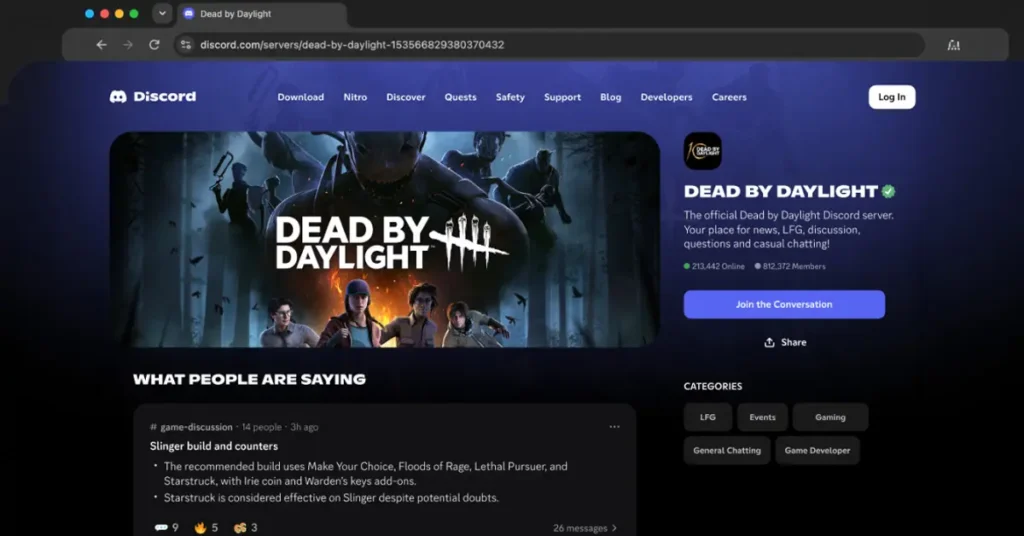
A Server Web Page is a public page that gives interested people an idea of its content that helps them decide whether they wish to join or not. Even without a Discord account, anyone can view it through web pages and search engines. Every Discoverable Server will have a dedicated Server Web Page. Administrators who already have a page do not need to create a new one. If they have not set one up, Discord will automatically publish a default page using the information from the existing Server Profile.
These pages can display two types of content from public channels:
1. Channel Summaries:
Channel summaries are automated summaries of active public discussions, which may start appearing from November 16, 2026. Administrators can control which public channels appear in the summaries, manage them, or turn them off. Discord says that summaries will not display usernames and avatars.
2. Channel Messages:
These are individual messages containing answers or useful information sent by the members in channels. These may begin to appear in search results from mid-December, depending on the server’s and member’s settings. Usernames and avatars will not be displayed with them. Discord will label participating public channels with an icon in the channel header. Members will be notified before they post, so they know their messages may appear on the server’s public web page.
What Are the Requirements for a Discoverable Discord Server?
Not every Discord server can have its messages featured on the web page. A server must meet Server Discovery requirements before it can become Discoverable.
According to Discord, a server must:
- Have at least 1,000 members.
- Be at least eight weeks old.
- Meet Discord’s activity and safety requirements.
- Follow the Discovery Guidelines before setting its server name, description, and channel names.
- Enable the two-factor authentication requirement for moderators.
Servers must continue meeting these requirements to remain Discoverable. Eligible Community Administrators can check whether their server is eligible by navigating to Server Settings > Access > Discoverable.
Which Countries Have Discord Message Visibility Enabled by Default?
Discord will enable individual message visibility by default in most regions. However, the setting will be turned off by default for users in the European Union and European Economic Area, the United Kingdom, Canada, Brazil, Australia, and South Korea. Teen users are excluded from this feature.
How to Turn Off Discord Public Message Visibility
Discord allows individual members and administrators separate controls to manage what appears on the web.
For Individual Discord Users
Members can prevent future messages from appearing on the web by following these steps:
- Open User Settings.
- Select Data & Privacy.
- Find Show my message content from Discoverable channels on web pages.
- Toggle the setting off.
Users can change this setting in Discord’s desktop app or in a web browser. Turning it off stops future messages from appearing, but messages sent while the setting was enabled may remain visible unless deleted. Messages sent before the mid-December launch are excluded from the initial rollout. Users must delete those messages individually to remove them from Discord’s Server Web Pages. Search engines may retain cached copies for some time.
For Server Administrators
Administrators can control which public channels appear on the web or disable all channels by navigating to Server Settings > Community > Web Presence. They should review these settings before Discord rolls out Server Web Pages and Channel Summaries. If they don’t change the setting, public channels remain enabled by default.
Channel Messages and Channel Summaries have separate settings. Turning off one does not automatically disable the other. Administrators who do not wish to have a public web page can turn off Discoverability, which changes the server to Community Server status.

Ajmal has a background in Communicative English and works across digital marketing, web development, content creation, and related digital areas. At Oratraex, he focuses on gaming, digital marketing, technology, and emerging digital trends, helping readers understand content that matters in the digital world.